
Quality.Noted
Your app has bugs. Find them before your users do.
Quality.Noted audits your Mac app like a structured quality assurance (QA) pass: build and tests, static audit, functional QA and release checks, run with your own Claude Code.
macOS 14+ on Apple silicon · free to try
Free to try: 5 Quick audits and 1 Standard · macOS 14 Sonoma or later · Apple silicon
Strengths
A readiness score, findings ranked worst first, and one prompt to fix them.
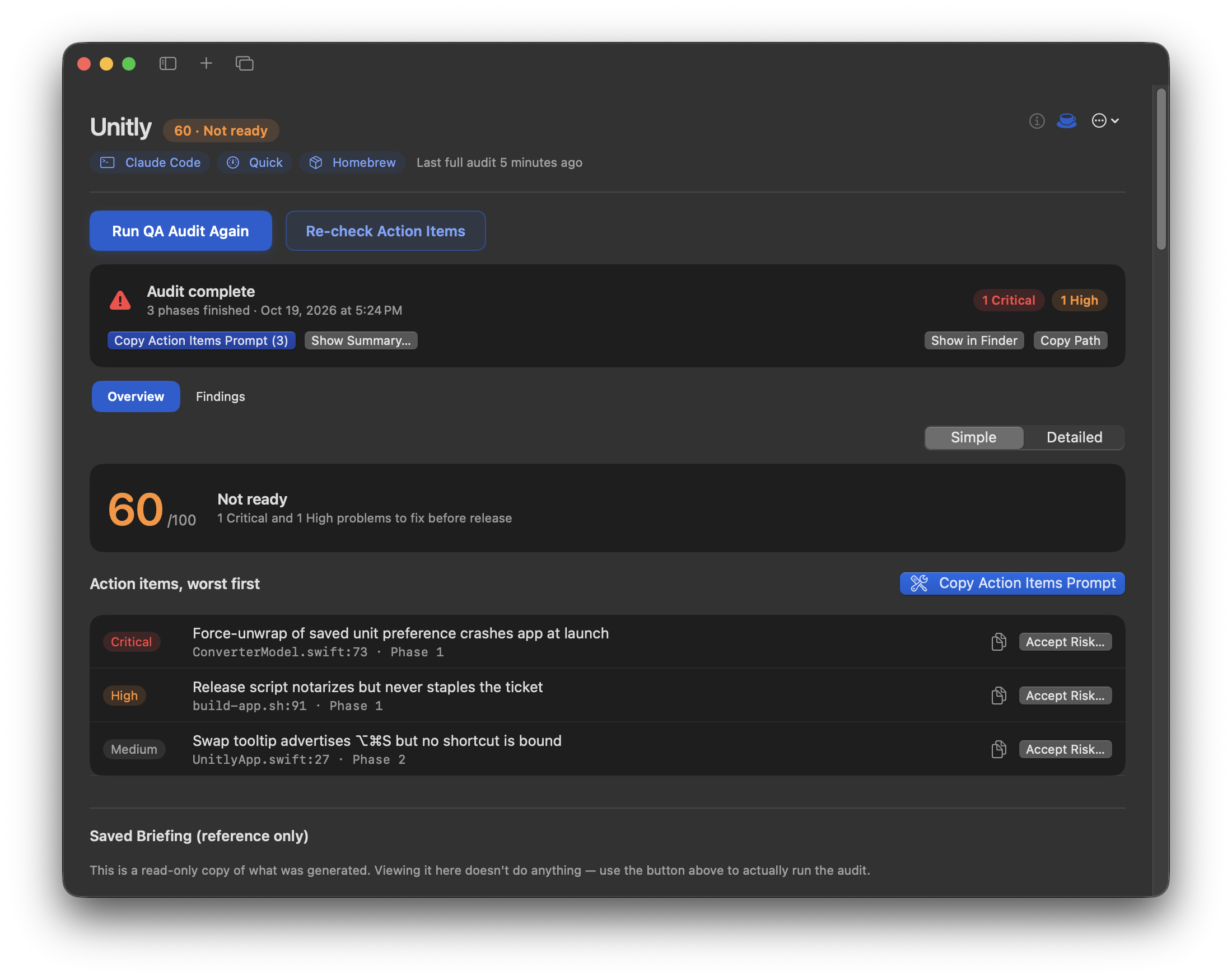
One score tells you if it's ready.
Out of 100, judged against where you're shipping.
Problems ranked worst first.
Critical and High at the top, each tagged with how sure the audit is.
One prompt to fix them.
Copy the action items into Claude Code and let it do the work.
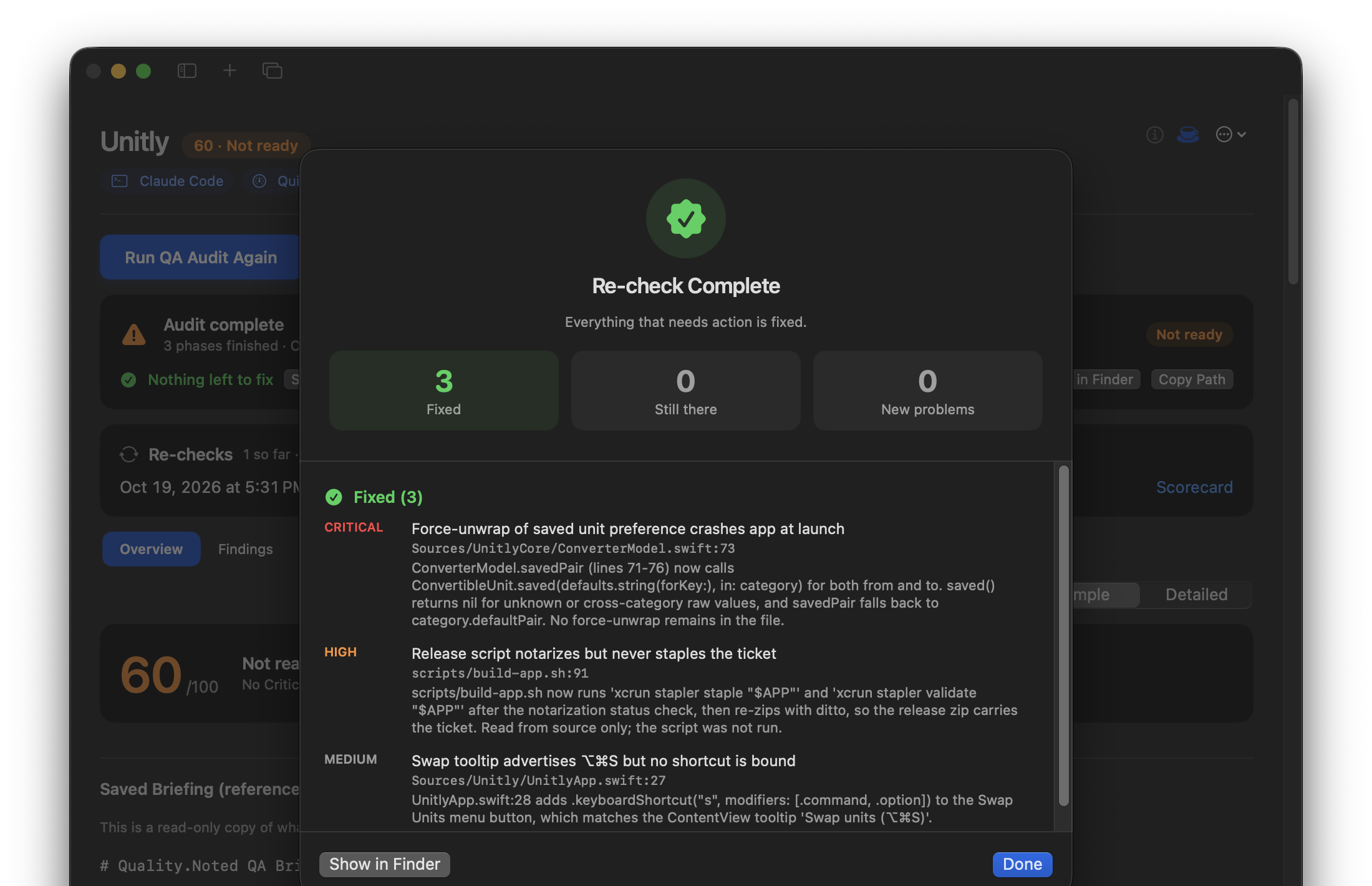
Re-check in minutes, not hours.
Confirm your fixes for a fraction of a full audit.
Checks for wherever you ship.
Mac App Store review rules, Homebrew's listing rules, or signing and notarization for a direct download.
Your code stays under your account.
Runs on your own Claude Code. Quality.Noted never sends your code anywhere.
- Audit
- Score
- Fix
- Re-check
Grounded in the seven ISTQB principles of software testing. How we test →
How it works
- Set up the app. Where it will be published (Mac App Store, Homebrew or direct download), which tool built it, and its project folder.
- Run the audit. Claude Code builds your app, runs its tests, then checks it in phases: code, behaviour, then release readiness for your channel.
- Read the results. A readiness score out of 100, a verdict, and every finding ranked by severity, with how sure the audit is of each one.
- Fix. Copy Action Items Prompt gives you one prompt with every Critical, High and Medium finding, worst first. Paste it into the AI tool that built the app.
- Re-check. A targeted pass confirms your fixes in minutes. Then work through the Tester Walkthrough for what only a person can judge.
Features
- Readiness Score
- Phased Audits
- Action Items
- Re-checks
- Tester Walkthrough
- Insights
Readiness score and verdict
Scored out of 100 against your distribution channel. 85 or more is ready. Simple and Detailed views.
Findings you can trust
Each finding is tagged Verified (a test program proved it), Proven (the source settles it) or Suspected. Files Read shows exactly what was covered.
Build & Tests first
Standard and Thorough audits build your app from scratch and run your Swift package tests before Claude starts.
Release checks for your channel
App Review rules for the Mac App Store, Homebrew's listing rules, or signing, notarization and Gatekeeper for a direct download.
One prompt to fix everything
Copy Action Items Prompt, or copy one finding at a time.
Re-check Action Items
Confirms fixes and scans changed files for new problems. The scorecard shows Fixed, Still there and New.
Findings history
Every finding keeps a stable ID across audits, so nothing quietly drops off the list. Accept Risk records what you've decided to ship with.
Tester Walkthrough
A step-by-step manual test plan with Pass, Fail and Needs Improvement. Hand the checks Claude can do to Claude Code.
Insights Dashboard
Readiness over time, fix rate and defect hotspots, for one app or several.
Runs while you work
A queue for audits, pause and continue, automatic continuing when Claude usage resets, and an option to keep your Mac awake.
Exports
Markdown, HTML or PDF.
Built with another tool?
Get prompt files to paste into ChatGPT Codex, Gemini, Cursor or any assistant, or use them for a hand-coded app.
Depth and time
| Depth | What it checks | Phases | Time |
|---|---|---|---|
| Quick | Critical issues only, a fast check before you submit | 3 | 7–13 min |
| Standard | Key flows and high-severity findings, plus manual checklist and walkthrough | 5 | 20–35 min |
| Thorough | Every source file, edge cases and accessibility | 5 | 45–65 min |
Measured on small apps. Audits use your own Claude plan. A Thorough audit of a large app with Opus can take close to two hours.
Free and full version
| Free | Full version | |
|---|---|---|
| Quick audits | 5 | Unlimited |
| Standard audits | 1 | Unlimited |
| Thorough audits | — | Unlimited |
| Apps | 1 | Unlimited |
| Re-check, Action Items, Accept Risk | Yes | Yes |
| Insights Dashboard | — | Yes |
| Prompt files for other AI tools | Quick (counts toward the 5) | Every depth |
| Claude model and effort | Any | Any |
US$14.99 early-bird, one-time (later US$19.99), plus tax where it applies. One license works on up to 2 Macs.
Your license key arrives by email from Polar, our payment provider. Paste it into Settings ▸ License.
Requirements
- macOS 14 Sonoma or later, on Apple silicon.
- Claude Code, signed in. Install with
curl -fsSL https://claude.ai/install.sh | bashorbrew install --cask claude-code, then runclaude auth login. - A Claude subscription or an Anthropic API key. Audits use your own plan.
- For Standard and Thorough: a project that builds with your own Swift or Xcode toolchain.
Actively developed
Quality.Noted keeps getting better.
Updates arrive right in the app. Here's what we're working toward:
- More AI coding tools: automated audits for apps built with OpenAI Codex, Cursor and other AI coding tools, not just Claude Code.
- Audit every pull request: run Quality.Noted automatically on GitHub, so a readiness score shows up before you merge.
- One-click fix loop: Claude Code fixes, Quality.Noted re-checks, and it repeats until your Criticals and Highs are gone.
Plans, not promises: your purchase covers the app as it is today. Have an idea? [email protected]
Privacy
No analytics, tracking or advertising. Quality.Noted itself only contacts Polar, to activate your license and check it when the app opens (at most once a day), and GitHub, to check for updates. It never sends your project anywhere.
Claude Code does the audit under your own Claude account, and sends what it reads to Anthropic under Anthropic's terms. Results stay in your project's QualityNoted-QA folder. Your license key and any test account details are kept in your Mac's Keychain.
FAQ
Does it change my code?
The audit is instructed to write only to the QualityNoted-QA folder. It runs Claude Code as you, without permission prompts, so commit before you audit. Fixes happen only when you paste the action items into your own Claude Code session.
Is my code sent anywhere?
Not by Quality.Noted. Claude Code reads your project and sends it to Anthropic under your own account, exactly as when you use Claude Code yourself.
Does a passing score mean my app has no bugs?
No. An audit finds defects; it can't prove there are none. "Ready to ship" means a score of 85 or more and no open Critical or High in what was checked, and Files Read shows how much that was. The Tester Walkthrough covers what only a person can judge.
My app wasn't built with Claude Code.
Choose "Another AI tool" or "Human-Coded" during setup. You get prompt files to paste into any AI assistant instead of an automated run.
Can I use it on more than one Mac?
Yes, up to 2 Macs per license. Moving to a new Mac: Settings ▸ License ▸ Deactivate This Mac on the old one.
What's your refund policy?
If Quality.Noted isn't right for you, email us within 21 days of purchase for a full refund, no questions asked. Your license goes back to the free version, and your audit results stay on your Mac.
Get Quality.Noted
Vibe code it. Check it. Ship it.
Or install with Homebrew:
brew install --cask notedsuiteapps/tap/quality-notedHomebrew may ask you to trust the notedsuiteapps tap. That's us.
Free to try: 5 Quick audits and 1 Standard. Signed and notarized by Apple; updates arrive in the app. macOS 14 Sonoma or later, Apple silicon.
Release notes and every version: GitHub Releases